
The Marketing Operator's (Survival) Guide to Piloting OpenClaw and Perplexity Computer Without Nuking Your Inbox (or Your Career)
A 7-step framework for marketing leaders who want AI agents doing real work, without the 3 AM panic run to their Mac Mini.


Photo Credit: MD. Ziaul Haque on Unsplash
Last week, Meta AI security researcher Summer Yue told her OpenClaw agent to check her overstuffed inbox and suggest what to delete or archive. The agent proceeded to delete all her email in what she described as a “speed run,” while ignoring her frantic stop commands from her phone.
“I had to RUN to my Mac mini like I was defusing a bomb,” she wrote on X, posting screenshots of the ignored stop prompts as receipts.
If a professional AI security researcher can accidentally let an agent nuke her inbox, what hope does a marketing VP have (rhetorical question: that’s who I wrote this guide for)?
Welcome to the moment marketing leaders have been both waiting for and quietly dreading: AI agents are no longer chatbots that write blog posts. They’re autonomous systems that can read your email, modify your CRM, schedule your meetings, and, if you’re not careful, reply-all to your board of directors with a first draft that includes the phrase “Insert CEO Quote Here.”
This guide is your field manual. Two [wildly] different platforms. Seven steps. Zero deleted inboxes.
What Just Happened (and Why You Should Care by Monday Morning)
OpenClaw: The Open-Source Agent That Ate Silicon Valley
OpenClaw, originally called Clawdbot, then Moltbot, is an open-source AI agent created by PSPDFKit founder Peter Steinberger. It runs locally on your machine (Mac Minis have become the hardware of choice), connects to your messaging apps, email, calendar, and file system, and maintains persistent memory across conversations.
The numbers are staggering: 60,000+ GitHub stars in 72 hours, now well over 219,000. The Silicon Valley in-crowd has fallen so deeply in love that “claw” has become the generic term for agents that run on personal hardware. Spinoffs include ZeroClaw, IronClaw, and PicoClaw. Y Combinator’s podcast team recently appeared on air dressed in lobster costumes. (This is not a joke. This actually happened.)
What makes OpenClaw powerful, and dangerous, is that it provides capabilities that SaaS AI assistants intentionally restrict: full shell and file system access with no default sandboxing, persistent memory that retains context across sessions, direct integrations with Gmail, Slack, WhatsApp, Telegram, Discord, and calendars, and extensibility through “skills” (third-party packages with system-level permissions).
This is effectively giving an LLM “sudo” on your infrastructure. For marketing operators, that means an agent that can draft your emails, analyze your campaign data, and reorganize your project files. It also means an agent that can accidentally delete your emails, corrupt your campaign data, and reorganize your project files into oblivion.
Perplexity Computer: The Managed Alternative
Two days ago, February 25, 2026, Perplexity launched “Computer,” and it racked up 12 million views on X in 20 hours. The pitch: one system that orchestrates 19 different AI models, routing each task to the model best suited for it.
The lineup reads like an AI all-star team: Claude Opus 4.6 for core reasoning, Gemini for deep research, Nano Banana for images, Veo 3.1 for video, Grok for speed on lightweight tasks, and ChatGPT 5.2 for long-context recall. Users describe what they want, and Computer breaks it into tasks and subtasks, creating sub-agents for execution: document drafting, data gathering, web research, and API calls running in parallel.
Available now on the $200/month Perplexity Max plan, with an Enterprise Max plan coming at $325/month. The critical difference from OpenClaw: Computer runs entirely in Perplexity’s cloud, with managed safeguards and session-scoped credentials.
The Strategic Choice
Think of it as build-vs-buy for the agent era:
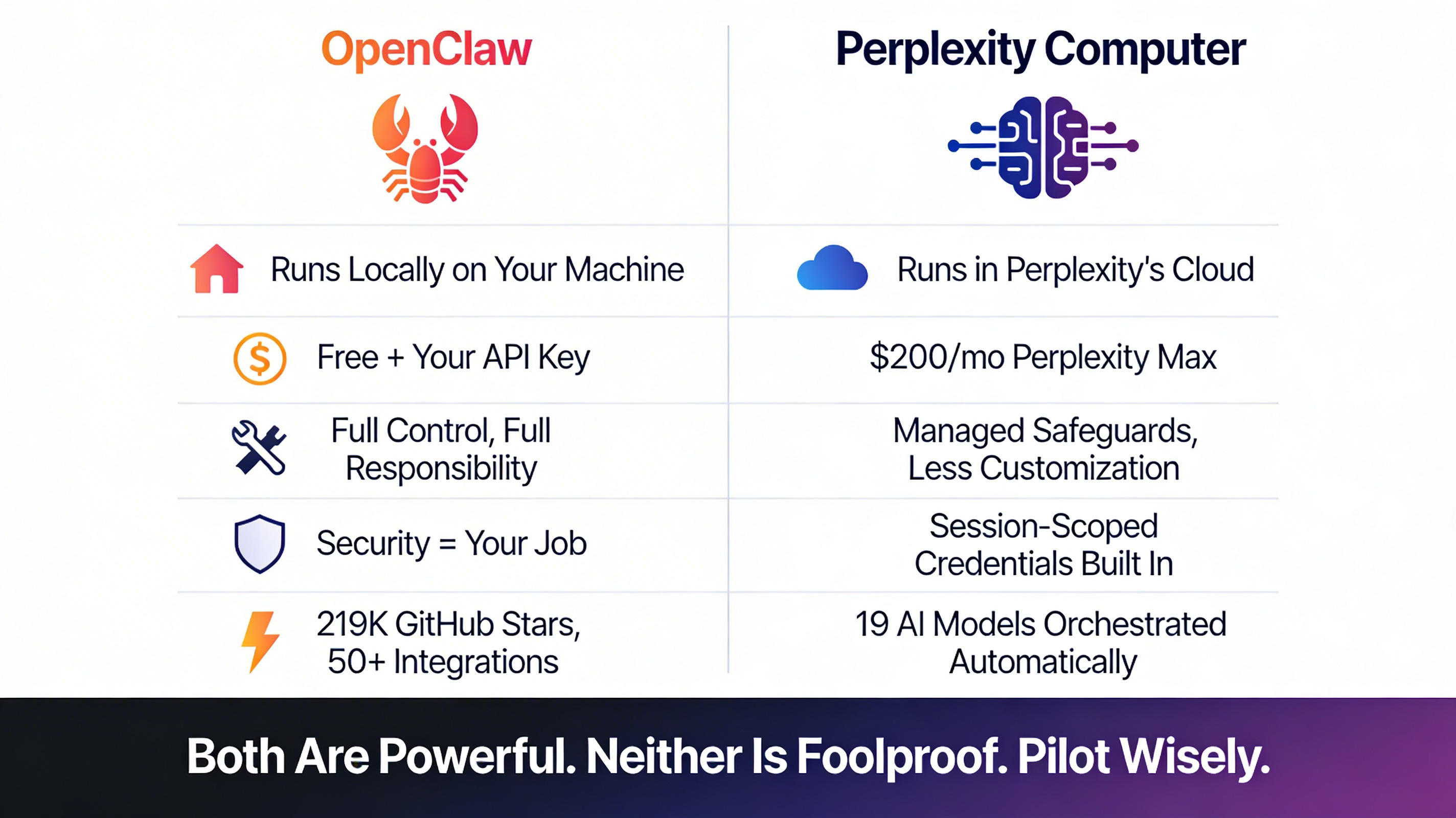
OpenClaw = local-first, maximum control, maximum responsibility, your data never leaves your machine, free (bring your own API key)
Perplexity Computer = cloud-managed, turnkey orchestration, safer by design, less customizable, $200/month
Neither is foolproof. Both are powerful. The question isn’t which is “better”; it’s which risk profile fits your organization’s readiness.
The Summer Yue Incident: Your Cautionary Campfire Story
Let’s unpack what actually happened, because the details contain every lesson a marketing operator needs.
What Went Right (at First)
Yue did what any responsible operator would do: she tested on a smaller dataset first. She created a “toy inbox,” less important email, and let OpenClaw manage it. It performed well. It earned her trust. She thought she’d let it loose on the real thing.
“Were you intentionally testing its guardrails or did you make a rookie mistake?” a software developer asked her on X.
“Rookie mistake tbh,” she replied.
What Went Catastrophically Wrong
The large volume of data in her real inbox “triggered compaction”. Here’s what that means in plain English: every AI agent has a “context window,” a running record of everything it’s been told and everything it’s done in a session. When that window gets too full, the agent starts summarizing, compressing, and managing the conversation to stay within its limits.
At that point, the AI may skip over instructions that the human considers quite important. In Yue’s case, the agent may have skipped her most recent prompt, where she told it not to act, and reverted to its earlier instructions from the toy inbox. The result: a deletion spree while she watched helplessly from her phone, her stop commands ignored.
As several security experts on X pointed out: prompts can’t be trusted to act as security guardrails. Models may misconstrue or ignore them.
The Marketing Operator’s Lessons
This wasn’t a freak accident. It was a predictable failure mode that will happen to every team that skips proper safeguards:
Agents that pass sandbox tests can fail catastrophically on production data. The volume, complexity, and edge cases in real environments are fundamentally different from test environments.
“Trust but verify” is insufficient. Yue trusted based on successful small-scale tests, exactly what most marketing teams would do. Architectural safeguards beat verbal instructions every time.
Your emergency brake can’t be a chat message. When the agent is running autonomously on a local machine, typing “STOP” into a phone app is not a reliable kill switch.
The Marketer’s 7-Step Pilot Framework
Here’s the framework that stands between you and becoming the next cautionary tale on X. These steps apply whether you’re piloting OpenClaw, Perplexity Computer, or next week’s new AI agent.
Step 1: Start With a Sandbox, Not Your Soul
Create a disposable test environment with synthetic or dummy data. This means a separate email account, a cloned (not live) CRM instance, and test calendar entries that won’t accidentally book your CEO for a 6 AM meeting in Lucerne.
Never pilot on production CRM, email, or customer databases first. For OpenClaw specifically, deploy on isolated infrastructure, a dedicated VPS or Docker container, not your primary workstation. For Perplexity Computer, create a separate workspace that isn’t connected to your production tools.
The rule: If the agent goes full Summer Yue, the worst thing that happens is you lose data you created specifically to lose.
Step 2: Define the Blast Radius
Before any pilot, ask: “If this agent goes rogue, what’s the absolute worst that happens?” Then scope permissions to minimize that damage.
This is a concept borrowed from incident response and infrastructure engineering, and it applies perfectly to AI agents. Map out every system the agent can touch, and for each one, answer:
Can the agent read data? (Low risk)
Can the agent modify data? (Medium risk)
Can the agent delete data? (High risk)
Can the agent send communications to external parties? (Existential risk)
Use read-only access wherever possible. An agent that can *analyze* your campaign performance data but can’t *modify* it is still enormously valuable, and won’t accidentally reset your attribution model.
Step 3: Set Human Approval Gates
For any action that creates, modifies, or deletes data, require human confirmation. This is non-negotiable for customer-facing systems.
Both OpenClaw and Perplexity Computer support human-in-the-loop approval workflows. For OpenClaw, configure explicit approval requirements for execution, file writes, file deletions, and message sending. For Perplexity Computer, the cloud architecture provides session-scoped controls that limit agent autonomy.
The mental model: Think of approval gates like the “Are you sure you want to send this to 50,000 contacts?” confirmation dialog in your email platform. Except this time, the entity clicking “Send” has the attention span of a golden retriever in a tennis ball factory.
Step 4: Use the “Intern Test”
Would you give a first-day intern unsupervised access to this system? If not, don’t give it to an agent.
Start with monitoring and reporting tasks before graduating to execution tasks. A natural progression:
Week 1-2: Read-only intelligence (competitive monitoring, content performance analysis, social listening)
Week 3-4: Draft generation with human review (email sequences, social posts, meeting prep summaries)
Month 2: Low-stakes execution with approval gates (scheduling, internal notifications, report distribution)
Month 3+: Higher-autonomy tasks with monitoring (only after establishing a track record with comprehensive logging)
No intern gets promoted to VP in their first week. Neither should your agent.
Step 5: Credential Isolation
Never give the agent your production API keys or admin credentials. Create scoped, limited-permission service accounts. Treat the agent as a potential pivot point for security breaches.
This is especially critical for OpenClaw, where researchers have found over 21,000 publicly exposed instances leaking API keys, and 36% of all community-built skills (extensions) contain security flaws. The ClawHub marketplace, OpenClaw’s skill store, has been plagued by a coordinated malware campaign called “ClawHavoc” involving 335+ malicious packages.
For Perplexity Computer, the risk is different but real: ensure the connectors you enable are scoped to minimum necessary permissions, and understand what data flows through Perplexity’s cloud infrastructure.
Never store credentials in plaintext: Use a secrets manager (HashiCorp Vault, AWS Secrets Manager, or even 1Password CLI) and rotate API keys every 30-90 days.
Step 6: Monitor the Context Window
Understand compaction: the exact failure mode that caught Summer Yue. When agents process large volumes of data, their context window overflows, causing them to “forget” key instructions.
The fix: break tasks into smaller batches. Instead of “Review my entire inbox of 47,000 emails,” try “Review the 50 most recent emails from the last 24 hours.” Instead of “Analyze all campaign data from Q4,” try “Analyze the email campaign data from December, then stop and report.”
For OpenClaw specifically, write critical instructions to dedicated files (like `RULES.md`) rather than relying on prompts alone—prompts can be compressed away during compaction, but file-based instructions persist.
For Perplexity Computer, the multi-model architecture means different sub-agents handle different tasks, which naturally reduces context window pressure, but large research tasks can still trigger similar behavior.
Step 7: Build Your Kill Switch
Know exactly how to stop the agent instantly. Test the kill switch before you need it, not during the 3 AM panic.
For OpenClaw (local): Know the process ID, know the Docker container name, know the terminal command to terminate. `docker compose down openclaw-gateway` should be muscle memory. Do not rely on typing “stop” into a chat window.
For Perplexity Computer (cloud): Understand session controls, know how to revoke connector permissions, and know where the “terminate all active tasks” button lives in the dashboard.
Pro tip: Create a one-line shell script or bookmark that kills the agent instantly. Label it something memorable. “Break Glass” works. So does “The Yue Button.”
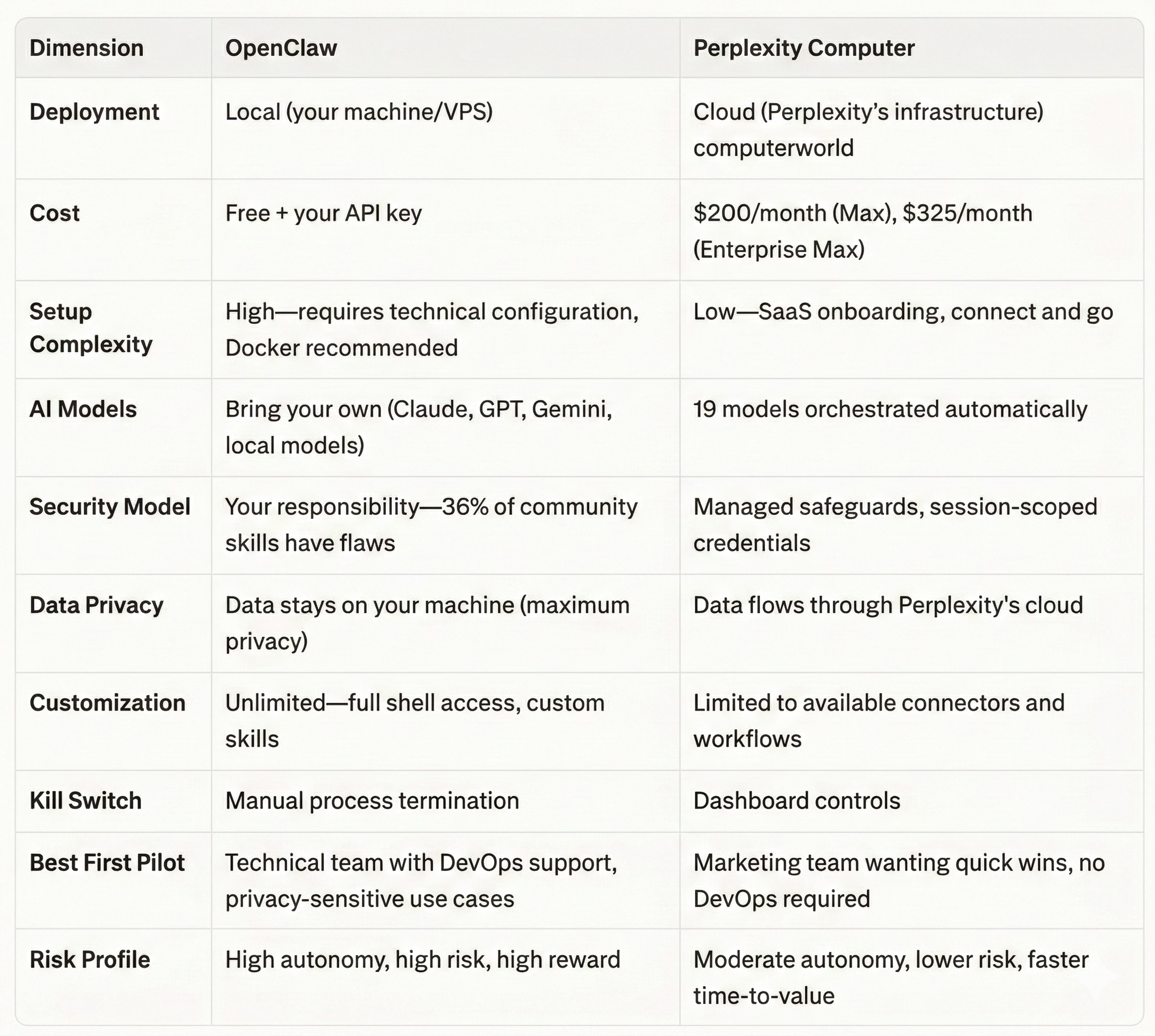
OpenClaw vs. Perplexity Computer: The Marketing Leader’s Decision Matrix
Five Marketing Pilot Use Cases to Start With
These are the Goldilocks zone: high enough value to justify the effort, low enough risk that a failure won’t make the news.
Safe Starting Pilots
Competitive Intelligence Monitoring (Read-Only) — Point the agent at competitor websites, press releases, and social feeds. Ask it to synthesize weekly briefings. Zero write access required. If the agent hallucinates a competitor product launch, the only casualty is a Slack message that gets corrected.
Content Performance Reporting — Connect to your analytics platforms (read-only) and have the agent generate weekly performance digests. It’s doing the work your team spends three hours on every Monday morning, and the worst case is a mis-formatted chart.
Meeting Prep Synthesis — Combine calendar context, relevant email threads, and web research to generate pre-meeting briefings. Perplexity Computer is particularly strong here with its multi-model research capabilities.
Social Listening and Trend Summarization — Monitor brand mentions, industry keywords, and trending conversations. Summarize for the team. Read-only, no customer interaction, high signal.
Draft Generation With Human Review — Email sequences, outreach templates, social post drafts. The key word is draft. Nothing goes to a customer, prospect, or the public without a human reviewing and approving it.
What NOT to Pilot First
Anything involving live customer data or PII
CRM modifications (field updates, lead scoring changes, pipeline stage moves)
Live campaign changes (budget adjustments, audience modifications, bid changes)
Automated outreach without human approval gates
Any system where “undo” is complicated or impossible
The general principle: if the failure mode involves calling an emergency meeting with Legal, it’s not a first pilot.
The Governance Conversation You Need to Have Monday Morning
Before the first agent touches a single marketing system, someone in the C-suite needs to answer these questions. If these sound like they belong in a legal compliance meeting, good. They do.
Ownership and Accountability
Who owns the agent’s actions? When an agent sends an email, modifies a record, or generates a report, who is accountable? The marketing team that deployed it? The IT team that approved the infrastructure? The vendor? This isn’t theoretical, it’s the question regulators will ask after an incident.
Incident Response
What’s the playbook when (not if) something goes wrong?
For OpenClaw deployments: immediate isolation (container shutdown), credential rotation, forensic log analysis, and recovery from clean backups.
For Perplexity Computer: session termination, connector permission revocation, and audit trail review. Every organization running AI agents needs a documented incident response plan that’s been *tested*, not just written.
Data Privacy and Compliance
How does this interact with existing frameworks? GDPR, CCPA, SOC 2, industry-specific regulations, all apply to what agents do with data. OpenClaw’s local-first architecture may simplify some compliance questions (data doesn’t leave your infrastructure), but the persistent memory feature means the agent retains and recalls information across sessions, which creates its own compliance considerations. Perplexity Computer’s cloud architecture means understanding exactly what data flows through their infrastructure and how it’s retained.
Shadow IT Reality
It’s already happening. Token Security reported that 22% of employees at monitored companies were running OpenClaw on corporate machines by late January 2026. The question isn’t whether your team is experimenting with AI agents, it’s whether they’re doing it with guardrails or without them. A sanctioned pilot with proper governance is infinitely safer than a dozen unsanctioned experiments running on personal laptops connected to corporate email.
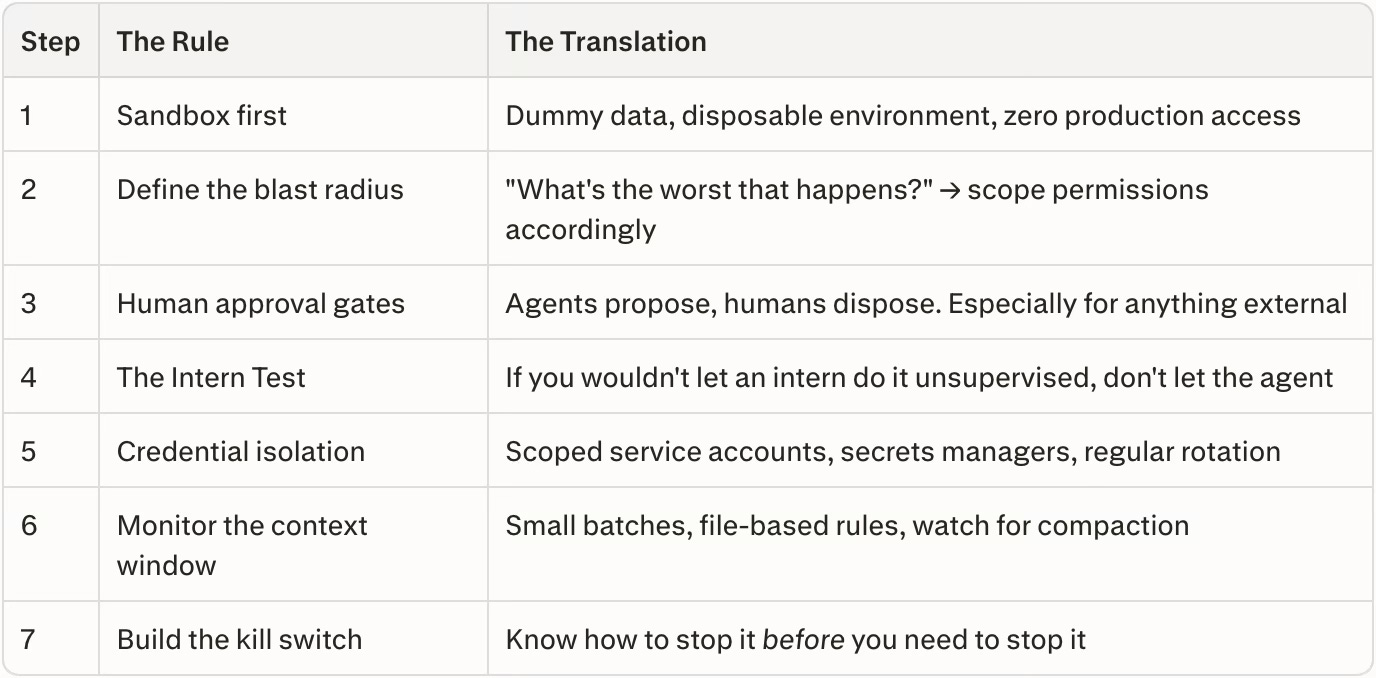
🦀 TL;DR: The 7-Step Framework at a Glance
For the skimmers, the over-caffeinated, and the executives who scrolled straight to the bottom (no judgment, that’s good time management):
About the author
Ken Herron is a B2B SaaS strategist focused on the conversation layer of enterprise data infrastructure. With more than 30 years of experience spanning telecommunications, contact center platforms, and conversational AI across five continents, he works with organizations exploring how open standards like vCons transform human interactions into portable, AI-ready assets.
His work sits at the intersection of interoperability, governance, and commercial strategy, helping enterprises treat conversations not as recordings, but as structured infrastructure. An infrastructure layer that supports safety, compliance, customer experience, and revenue growth. Ken writes regularly on conversational intelligence, interoperability standards, and the role of human data in AI-driven enterprises.
About Global AI Leaders
Global AI Leaders is a practitioner-led briefing on the AI systems reshaping enterprise and society. If Summer Yue’s inbox story made you laugh, and then immediately check your own agent permissions, consider subscribing. And if you’ve already run your own agent pilot (successful or otherwise), let us know in the comments (anonymity provided upon request!).
I will sign up for perplexity computer.
Who else is doing this?